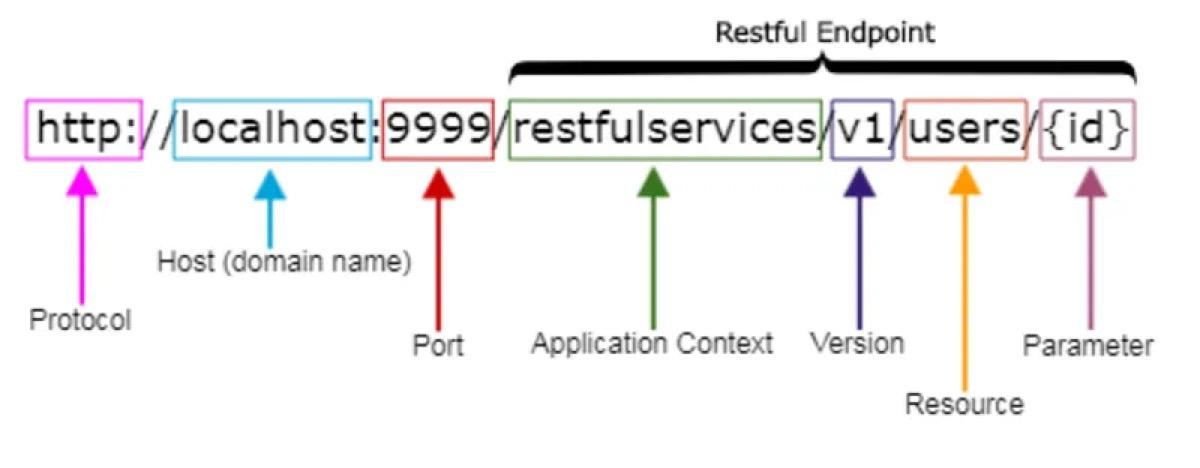
REST APIs work with resources (data) using the HTTP protocol. The key to a successful REST API is following proper naming conventions and best practices. In this article, we'll give practical advice on how to name REST API URIs.
1. Naming Resources: Use Nouns
Always use nouns in URIs, not verbs. This fits REST's "resource-based" principle.
Wrong:
GET /getUsers→ Wrong naming to get users.POST /createUser→ Wrong naming to create a user.DELETE /deleteUser/1→ Wrong naming to delete a user.
Right:
GET /users→ Right naming to get the user list.POST /users→ Right naming to create a new user.DELETE /users/1→ Right naming to delete the user with ID 1.
2. Use Plural Form
Always use plural form for resource names. It makes the API more readable.
Wrong:
GET /user→ Singular form is wrong.POST /user→ Singular form is wrong.
Right:
GET /users→ Plural form is right.POST /users→ Plural form is right.
3. Use Lowercase Letters
Always use lowercase letters in URIs. Uppercase or mixed case hurts readability.
Wrong:
GET /Users→ Uppercase is wrong.GET /UserDetails→ Uppercase is wrong.
Right:
GET /users→ Lowercase is right.GET /user-details→ Lowercase is right.
4. Use Hyphens (-)
Use hyphens (-) instead of spaces between words. Underscores (_) hurt readability and can cause issues in some systems.
Wrong:
GET /user_details→ Underscore is wrong.GET /userProfile→ Mixed case is wrong.
Right:
GET /user-details→ Hyphen is right.GET /user-profile→ Hyphen is right.
5. Avoid File Extensions
Don't use file extensions (.json, .xml) in URIs. Determine the format via the Content-Type header.
Wrong:
GET /users.json→ File extension is wrong.GET /users.xml→ File extension is wrong.
Right:
GET /users→ Right without file extension. Header:Accept: application/json
6. Use Slashes (/) to Show Hierarchy
Use / to show hierarchy between resources.
Examples:
GET /users/1/orders→ Right naming to get a user's orders.GET /categories/5/products→ Right naming to get a category's products.
7. Use Query Parameters for Filtering, Sorting and Pagination
Use query parameters for filtering, sorting and pagination.
Examples:
GET /users?status=active→ Right naming to get active users.GET /users?sort=asc&limit=10→ Right naming to get 10 users in ascending order.GET /users?page=2&per_page=20→ Right naming to get 20 users on page 2.
8. Assign HTTP Methods by Action
Use HTTP methods (GET, POST, PUT, DELETE) to define which action is performed on a resource.
Examples:
GET /users→ Gets the user list.POST /users→ Creates a new user.PUT /users/1→ Updates the user with ID 1.DELETE /users/1→ Deletes the user with ID 1.
9. Use Versioning
Equip your API with a version. It's essential for updating the API in the future.
Examples:
GET /v1/users→ Right naming for version one.GET /v2/users→ Right naming for version two.
10. Avoid Deeply Nested URIs
Avoid very deep nested URIs. Don't use nested URIs deeper than 2–3 levels.
Wrong:
GET /users/1/orders/123/items/456→ Too deeply nested URI is wrong.
Right:
GET /users/1/orders→ Properly nested URI is right.GET /orders/123/items→ Properly nested URI is right.
11. Use HTTP Status Codes Correctly
Use HTTP status codes correctly:
- 200 OK: Successful request.
- 201 Created: New resource created.
- 400 Bad Request: Bad request.
- 401 Unauthorized: No permission.
- 404 Not Found: Resource not found.
- 500 Internal Server Error: Server error.
12. Follow Consistent Naming Rules
Follow the same naming rules across all URIs. For example, always use plural form and write in lowercase.
Conclusion
Following proper naming conventions makes a REST API easier to read, use and evolve. Follow this advice and you'll build more efficient, professional APIs.
Good luck! 🚀